Smart statement parsing
Upload bank statements in any major format. Our AI automatically extracts transactions, identifies patterns, and matches them against your invoices for seamless reconciliation.
Inbox Ledger pulls every invoice from your inbox, extracts the data with AI, and matches it against your bank statements. So your books actually close, instead of leaving you a pile of scanned PDFs.
No credit card required · Full refund any time, with no 30-day window · Read-only access to your inbox
We can read invoices, but never send or delete on your behalf.
Email passwords and tokens are stored encrypted in a vault. Even our team cannot read them.
Independently assessed under Google CASA Tier 2, the review required for production access to restricted Gmail scopes.
Your documents and extracted data are stored in EU data centers.
GDPR compliant, with a Data Processing Agreement available on request.
Polar is our Merchant of Record. Card details never touch our servers.
Replaces BankStatementConverter
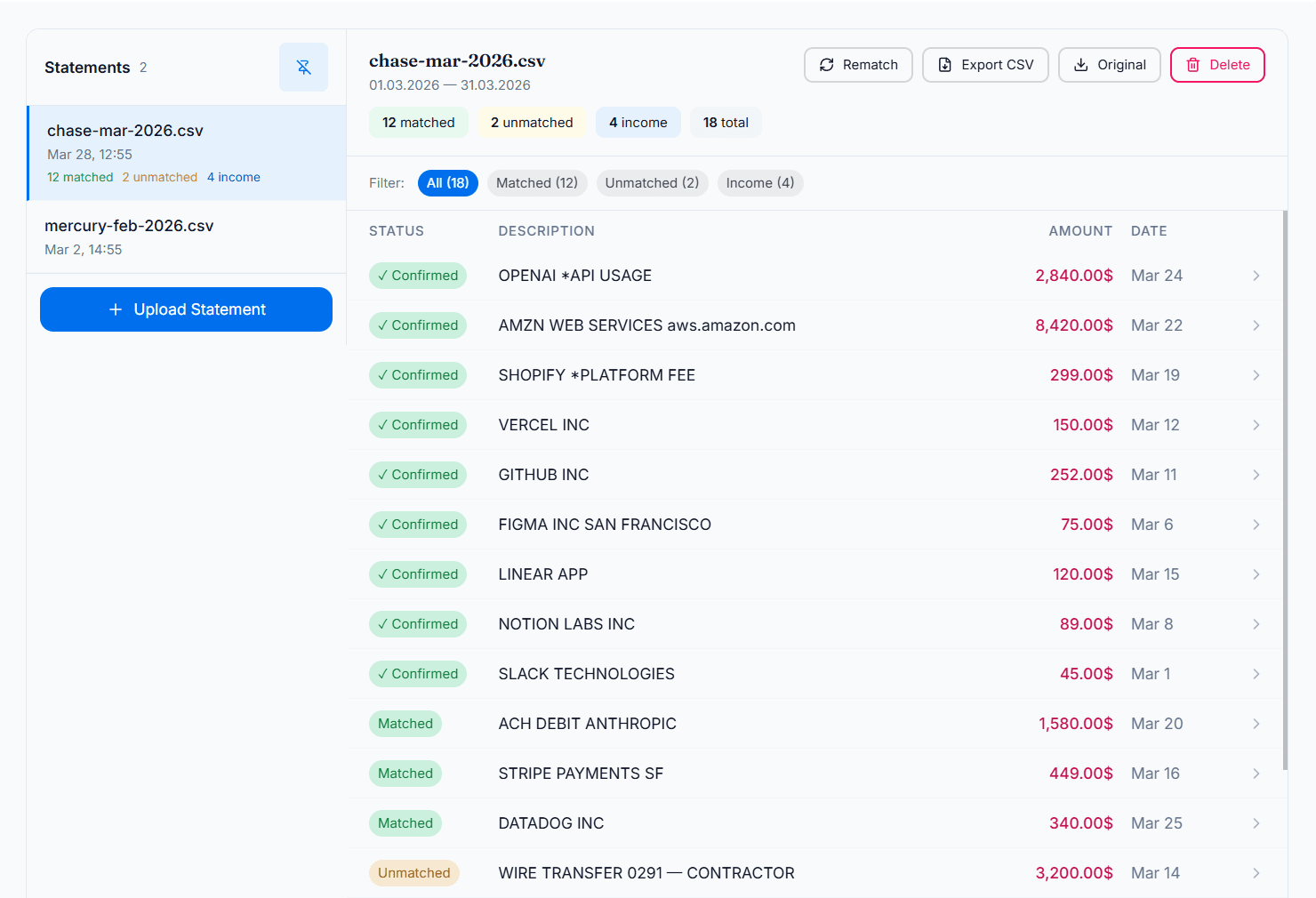
Upload PDF, CSV, XLSX, or 5 more formats. AI matches every transaction to your invoices with a confidence score and a plain-English reason. Confirm in one click and the invoice is marked paid.
Upload bank statements in any major format. Our AI automatically extracts transactions, identifies patterns, and matches them against your invoices for seamless reconciliation.
Expenses in USD, transactions in EUR? No problem. Our system automatically converts and matches across any currency pair.
Connect once and Inbox Ledger watches your mailbox, and your team's, for anything that looks like an invoice. It reads each document, checks it against what you already have, and files it. No forwarding address, no manual import.
Replaces WellyBox, SparkReceipt
When invoices accumulate, disorder follows. Quarter-end arrives, and suddenly you're hunting for hundreds of missing documents. Or chasing colleagues for files they forgot to share.
Inbox Ledger continuously scans your mailbox (and your team's) to capture every incoming invoice in real time. PDF attachments, images, embedded receipts, or links to download: our AI handles them all.
Invoices and receipts are pulled from attachments and from inline email bodies (Stripe, PayPal, Shopify), even when no PDF is attached.
AI reads vendor, amount, date, currency, and line items in seconds, not hours. When it cannot read one, that document does not vanish. It lands in your dashboard marked Failed, with the reason written on it.
Every file is fingerprinted with SHA-256 on arrival. A receipt that shows up as an attachment, again as a forward, and again on the next sync is recognized as one document.
On first connect, Inbox Ledger back-scans up to 6 months of past invoices, with no manual import. After that you can scan backwards over this year, last quarter, or any custom date range you need.
Replaces manual data entry
Invoice extraction is just the beginning. Define your rules in plain language, and AI applies them to every invoice, automatically. No code, no complex setup.
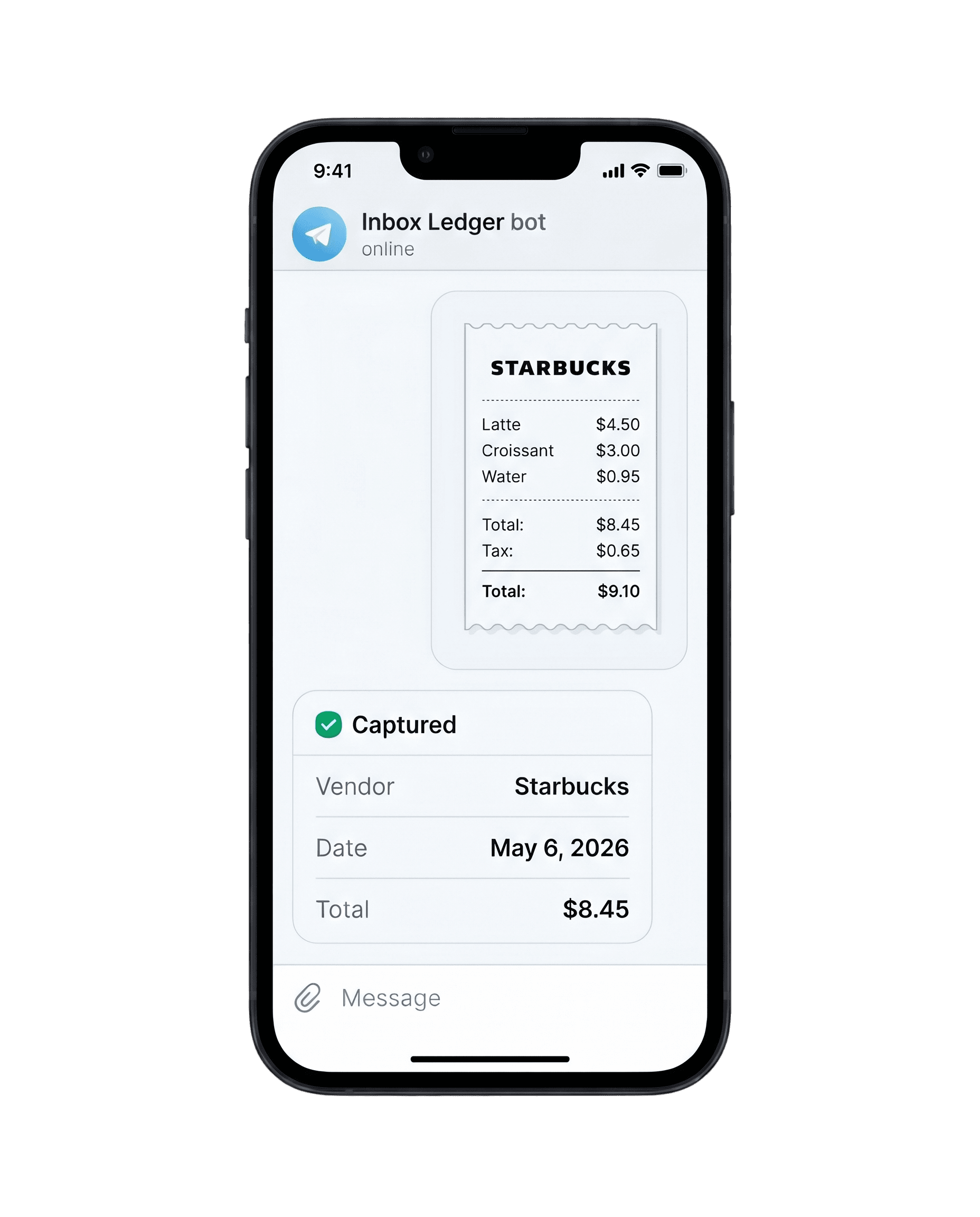
Forward a photo to our Telegram or WhatsApp bot. It's OCR'd and synced before you close the app.
Works through our Telegram and WhatsApp bots.
Alternative to Dext, Hubdoc, AutoEntry
Product names and logos are trademarks of their respective owners, shown to state compatibility. Inbox Ledger is not affiliated with, endorsed by, or sponsored by them.
Cancelling is yours to do, from the billing portal in your account settings. For the money, one email to support@inboxledger.app is the whole process, and we refund in full, no questions asked.
Every invoice captured, extracted, and matched to your bank. Not just a pile of scanned PDFs.
We flag duplicate invoices before you pay them twice, with duplicate-payment and silent price-increase alerts on the way.
Export every invoice to a spreadsheet, Google Drive or OneDrive, or push it straight into QuickBooks and Business Central. Nothing stays locked in if you go.
Free to start, then from $15/mo billed annually See pricing
Connect your mailbox and your team's, process your first invoice within minutes, and pull in the whole current quarter.
Add Amazon, Stripe and 20+ other platforms, write your own processing rules, and export straight to your accounting software.
Every invoice files itself, and your team is out of repetitive data entry for good.
Real, publicly documented frustrations with Dext, Hubdoc, and AutoEntry, and how Inbox Ledger handles them.
Unused credits do not roll over, so you waste them in quiet months and run out during tax season.
Inbox Ledger firm plans share one annual invoice pool, and top-up credit packs never expire.
Too many documents land in the Failed tab, and the OCR misses dates or gets the amount wrong.
Inbox Ledger extracts vendor, dates, amounts, and line items, and anything it cannot read lands marked Failed with the reason written on it, one click from a reprocess.
Duplicate documents create phantom transactions you then have to hunt down and delete in Xero.
Inbox Ledger captures each document once, idempotently, so one invoice never becomes two records.
Per-document credit pricing gets expensive fast, especially for bank statements and line-item extraction.
Inbox Ledger prices by volume, and bank-statement extraction plus reconciliation are included, not billed per page.
It is slow, and you still upload documents by hand.
Inbox Ledger reads invoices straight from your inbox automatically, no manual uploads.
Feeds break and you get locked out and re-authenticated over and over.
Inbox Ledger connects with stable read-only email access (Gmail and Outlook), so sync just keeps running.
Everything you need to know about Inbox Ledger. Can't find what you're looking for? Reach out to our support team.
No credit card. Full refund any time, with no 30-day window.
Connect your inbox (Gmail, Outlook, or any IMAP provider) and Inbox Ledger scans for invoices in attachments, embedded images, email bodies, and download links. The AI pulls out the data and sends it straight to your accounting software — no manual entry.
Yes — process up to 10 invoices a month at no cost, no credit card needed. It's a fully functional account, so you can try every feature before committing to a paid plan.
New invoices pause until you upgrade your plan or grab a one-time credit pack from your dashboard. Credits never expire, so you can stock up for busy months and use them whenever.
Yes, unconditional money-back, anytime. If Inbox Ledger isn't the right fit, email support and we'll refund you in full, no questions asked. No lock-in, cancel whenever you want.
Yes — security comes first. We connect to your inbox in read-only mode: we can read invoices, but we can never send, write, or delete anything on your behalf. We don't keep the original emails — only the invoice details extracted from them. Everything is encrypted, both when stored and in transit, and your invoices stay in your dashboard even if you delete the original email.
QuickBooks, Xero, and Business Central. You can also export to Google Drive, Google Sheets, or OneDrive, or push every processed document into a system of your own with outbound webhooks. A public API is planned, with no date attached to it yet.
One connect, one scan, and every invoice, vendor and recurring charge sits on a single screen.
Sign in with Google or Microsoft. No card, and nothing in your mailbox changes.
Invoices, vendors, recurring charges and duplicates, pulled out of the noise.
A clean breakdown of what is really in there, in minutes rather than an afternoon.
After that, upload a bank statement and the same invoices get matched against it.
Show me what's in my inboxNo credit card. Cancel from your billing settings, and one email brings every dollar back, with no 30-day window.