Invoice Management System: The Full Lifecycle of a Received Invoice
An invoice management system is the workflow that handles a received vendor invoice from inbox to archive. Here is the anatomy, where the manual process breaks, and how to evaluate one.

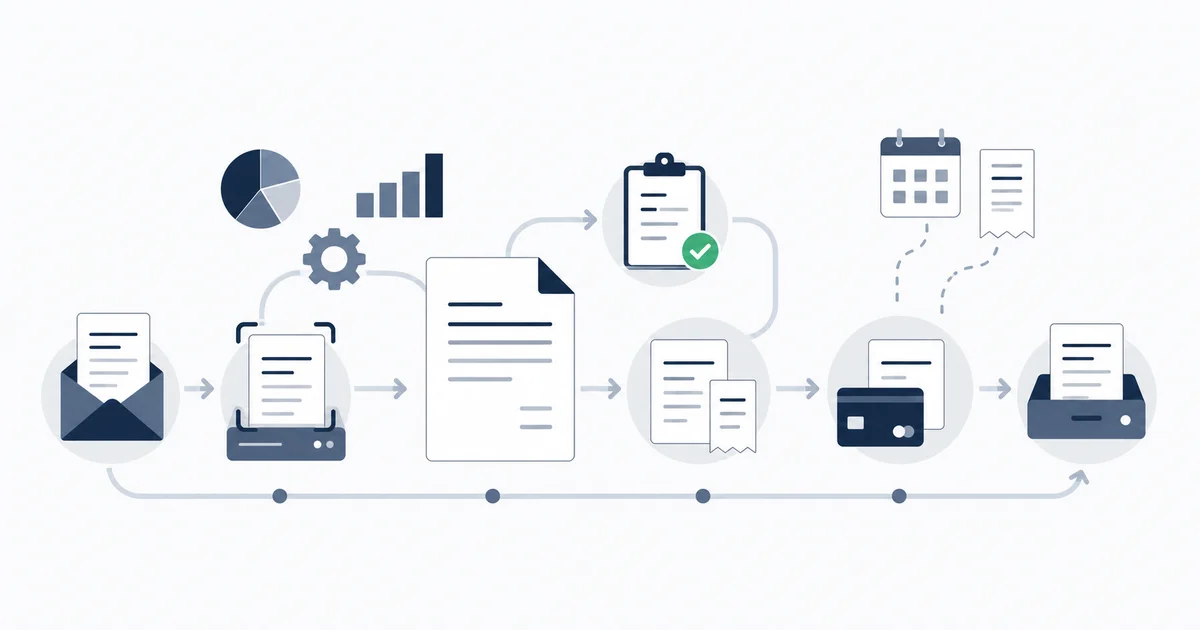
An invoice management system is the workflow and software that takes a received vendor invoice from the moment it lands in your inbox to the moment it is paid and filed for audit. For the accounts payable side, the invoices you receive and owe, that lifecycle has eight stages: receive, capture, store, status-track, approve, match or reconcile, pay, and archive. A real system is not any one of those stages; it is the thing that ties them together so an invoice cannot silently fall out between two of them. This guide walks the full anatomy, shows where the manual version breaks, and gives you a buyer's checklist for evaluating invoice management solutions.
One scope call up front, because the search term is ambiguous and an honest page should say so. "Invoice management system" gets used for two different jobs. One is accounts receivable: creating and sending invoices to your customers to get paid, which is what tools like Zoho Invoice or Invoice Ninja do. The other is accounts payable: managing the invoices you receive from vendors and have to pay. This page is about the second one, the received-invoice lifecycle. If you came here to send invoices and collect payment, this is not the page you want. Everything below is about invoices arriving, getting controlled, and getting paid correctly.
What an invoice management system actually is
Strip away the marketing and an invoice management system is a state machine for one document. Every invoice your business receives moves through a fixed sequence of states, and the system's job is to know which state each invoice is in, move it to the next state under the right conditions, and never lose it in between. When people say a tool "manages invoices," what they mean, whether they realize it or not, is that it owns that state machine.
That framing matters because it tells you what to evaluate. A tool that captures invoices beautifully but has no concept of approval status is not a management system; it is a capture tool. A tool with a slick approval workflow that cannot reliably get invoices into it is the same gap from the other side. The system is the whole loop, and the weak link sets the ceiling.
The eight stages of the received-invoice lifecycle
Here is the anatomy in order. Each stage has a single job, and each is a place an invoice can stall.
- Receive. The invoice arrives, by email attachment, a link inside an HTML email, a vendor portal, or paper that gets scanned. This is the messiest stage because you do not control how vendors send.
- Capture. The document is digitized and its data extracted: vendor, invoice number, date, due date, totals, tax, and ideally line items. Capture turns a PDF into structured data the rest of the system can act on.
- Store. The file and its extracted data are kept together, so the original document and its metadata never separate. An invoice without its source PDF is a liability at audit time.
- Status-track. The system knows where each invoice is: received, awaiting approval, approved, paid, disputed. Without this you cannot answer "what do we owe and when" without a manual hunt.
- Approve. The right person signs off before money is committed, ideally with the amount and the spend policy enforcing who approves what.
- Match or reconcile. The invoice is checked against something: a purchase order and goods receipt before payment (matching), or the bank transaction after payment (reconciliation). This is the control that catches overbilling and confirms the money cleared correctly.
- Pay. The payable is settled and the payment is recorded against the invoice, so the two are linked and nothing gets paid twice.
- Archive. The invoice, its document, its approval history, and its payment record are retained for audit and tax.
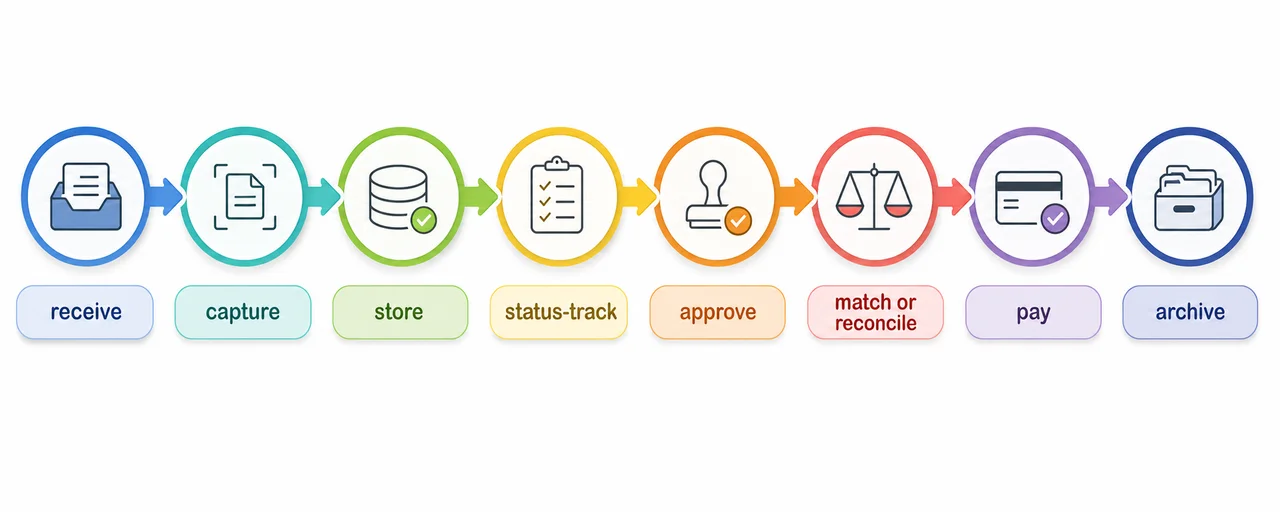
Notice that no single stage is the system. The system is the guarantee that stage two follows stage one for every invoice, that nothing skips from receive straight to paid without approval, and that nothing gets stuck between approve and pay until a vendor calls asking where their money is.
Vendor invoice management: the same lifecycle, supplier-side
When the lifecycle is viewed through the lens of your supplier relationships, it is usually called vendor invoice management, and it adds three concerns a generic invoice workflow can gloss over.
The first is vendor identity. The same supplier shows up under several names across invoices, purchase orders, and bank lines: Amazon.com Services LLC, AMZN Mktp, Amazon Web Services. A vendor-aware system resolves those to one canonical supplier so your per-vendor totals are real and your matching does not fail on a naming variation. The mechanics of that normalization are covered in the invoice matching software guide.
The second is duplicate control per vendor. A vendor sends the same invoice twice, or re-sends it with a suffix on the number, or it lands in two inboxes and gets entered by two people. Duplicate payments are not exotic; the ACFE Report to the Nations ranks billing schemes, including false and inflated vendor invoices, among the highest-risk fraud types by both frequency and median loss. Even setting deliberate fraud aside, accidental double payments are a common and recoverable form of leakage. Strong vendor invoice management catches the duplicate before payment, not in a recovery audit a year later.
The third is dispute readiness. When a vendor questions a charge, you need the original invoice, its approval history, and the payment record in one place, fast. That is the archive stage doing its job, scoped per vendor.
Vendor invoice management, then, is not a separate product category. It is the received-invoice lifecycle with the supplier-facing parts (identity, duplicates, disputes) taken seriously.
Where the manual invoice management process breaks
Most businesses start with a manual invoice management process: invoices live in inboxes, get forwarded, get entered into accounting software by hand, and get filed in folders. It works at low volume. It breaks in four predictable places, and the breaks are quiet, which is what makes them dangerous.
The manual process rarely fails loudly. It fails by omission: an invoice nobody captured, a payment made twice, an approval nobody can prove, a document nobody can find at audit. By the time you notice, the cost is already booked.
Silent misses
An invoice arrives in a salesperson's personal inbox, or as a link inside an HTML email, or sits in a vendor portal that never emails a human. Nobody forwards it. It is not late, it is not disputed, it simply never entered the process. You discover it when the vendor chases payment or when it surfaces at month-end as an unexplained gap. The manual process can only manage invoices that someone manually brought into it, and the ones that fall through are invisible by definition.
Duplicate payments
The same invoice gets entered twice, by two people, or in two months, or under two slightly different numbers. Accounting software warns on an exact-duplicate invoice number for the same vendor, but not on the near-duplicates: a re-sent invoice with a suffix, a copy in a second inbox, the same charge under a different vendor spelling. Each near-duplicate that slips through is money out the door that you then have to claw back, if you ever notice.
Lost approval trail
Approval happens over email, or verbally, or as a forwarded "ok to pay." Six months later, when finance or an auditor asks who authorized a $14,000 payment, the answer lives in someone's archived mail, if it exists at all. There is no enforced gate, so there is no reliable record that the gate was passed. This is the control most businesses think they have and most cannot actually prove.
No audit trail at close
At period-end you need to show, per invoice, the document, who approved it, and that the payment cleared and was reconciled. In the manual process those four facts live in four places: the PDF in a folder, the approval in email, the payment in the bank, the entry in the ledger. Reassembling them invoice by invoice is the month-end slog. A system that kept them together from the start makes the close a query instead of a reconstruction.
How to evaluate invoice management solutions
Once you see the lifecycle and the failure points, evaluating tools gets concrete. Ignore feature-count comparisons. Score a candidate on these eight criteria, which map directly to the stages and the breaks above.
| Criterion | What good looks like | Which stage it protects |
|---|---|---|
| Capture coverage | Connects to real inboxes (Gmail, Outlook, IMAP) and handles HTML links and portals, not just one forwarding address | Receive / silent misses |
| Line-item extraction | Pulls vendor, dates, totals, tax, and individual line items as structured data, not just a stored image | Capture |
| Duplicate detection | Catches near-duplicates across vendors and numbers, not only the exact-number case | Duplicate payments |
| Approval workflow | Enforced, recorded sign-off with rules by amount or policy, not an email ok-to-pay | Lost approval trail |
| Matching | Checks the invoice against a PO and receipt, or the bank transaction, with tolerance and exceptions | Match / overbilling |
| Reconciliation | Confirms the money that left the bank corresponds to the invoice you paid | Pay / leakage |
| Integrations | Exports clean, coded invoices to your accounting platform and storage without re-keying | Sync / pay |
| Audit trail | Keeps document, approval history, and payment record together, retained per retention policy | Archive |
A few of these deserve a sharper note.
Capture coverage is the criterion most buyers underweight and most regret. Every other stage is downstream of getting the invoice in. A tool with a perfect approval workflow and matching engine still misses every invoice that never reached it. Test capture against your actual mess: a portal-only vendor, an HTML receipt with the document behind a link, an attachment three replies deep in a forwarded thread. For the wider buyer's view of capture and extraction tools specifically, see the invoice data extraction software comparison.
Matching and reconciliation are two different controls and a complete system needs both. Matching runs before payment and verifies the invoice is accurate and authorized. Reconciliation runs after payment and verifies the money cleared correctly. A tool that does one and calls it "matching" leaves the other gap open. The full theory of how they differ is in what invoice reconciliation is.
Integrations decide whether the system is a layer or an island. The realistic architecture for most businesses is not "replace QuickBooks or Xero." It is a capture-and-control layer in front of the accounting platform that exports a clean, coded, approved invoice into it. If a candidate cannot export cleanly to your ledger, it becomes a second place to maintain data, which is worse than the manual process it replaced.
Build versus buy
A recurring question for finance-literate teams: can we just build this on the tools we already have? The honest answer is that you can build a partial system, and for some businesses that is the right call.
What you can assemble yourself: a shared inbox with forwarding rules (receive), a folder structure with a naming convention (store), a spreadsheet status column (status-track), an email approval norm (approve), and your accounting software's bank feed (reconcile). Stitched together with discipline, this manages a real invoice load. The how-to for the organization piece is how to organize invoices effectively, and the process and control discipline is accounts payable best practices.
Where the build approach hits its ceiling is the parts that need real engineering, not just discipline: reliable capture from scattered inboxes and portals, structured line-item extraction, duplicate detection across vendor-name variations, and an enforced approval trail that survives an audit. Those are exactly the stages where the manual process breaks, and they are hard to build well in-house. The build-versus-buy line, in practice, falls between the stages you can manage with convention (storage, status, basic approval) and the stages that need software doing real work (capture, extraction, duplicate control, matching). Buy where the work is genuinely hard; do not pay for what a folder and a rule already solve. The automation of the whole pipeline, end to end, is its own subject in invoice processing automation.
Start for free and extract your first 10 invoices without a credit card.
Where a reconciliation-first capture layer fits
Inbox Ledger is built for the front half of this lifecycle, the part that breaks: capture, extraction, duplicate control, and matching, feeding a clean invoice into the accounting platform you already use.
Here is the honest shape of it. Invoices are captured directly from Gmail, Outlook, and IMAP inboxes, not just a single forwarding address, including the messy cases: HTML receipts with the real document behind a link, attachments buried in forwarded threads, and high-volume sources that need portal-aware capture. The vendor, dates, totals, tax, and line items are extracted as structured data by an AI-powered pipeline, so the invoice is coding-ready rather than just stored. Where you have a purchase order or a bank statement, the matching engine checks the invoice against it, using tolerance rules, vendor-name normalization, and a date window, so overbilling and duplicates surface as exceptions instead of cleared payments. Then the clean, matched invoice exports to QuickBooks or Xero (and to Sheets, Drive, or OneDrive), where the ledger handles payment and the bank feed handles reconciliation.
And here is what it is not, because positioning a capture-and-matching layer as a full procure-to-pay suite is how trust gets lost. There is no purchase-order module that issues POs, no multi-tier approval-routing engine, and no general ledger. It does not replace your accounting platform; it makes the invoices reaching that platform clean and verified. If your requirement is full procurement with PO issuance and tiered approval inside one ERP, that is a different class of tool. If your problem is that invoices live scattered across inboxes, get into your books messily, and reconciling them against the bank is a manual slog every close, that is the exact seam this layer is built for. For the broader money workflow above invoice-level work, see what invoice reconciliation is.
An invoice management system is best understood not as a feature list but as a state machine for a received invoice: eight stages, and the guarantee that nothing falls out between them. The manual version breaks in four quiet places, silent misses, duplicate payments, a lost approval trail, and a month-end with no audit trail, and every one of those is a stage that lost its handoff. Evaluate a system by how well it owns the stages that are genuinely hard (capture, extraction, duplicate control, matching) and how cleanly it hands the rest to the accounting platform you already pay for. Get that division right and the system disappears into the background, which is exactly what a good one should do.