Invoice Matching Software: How Automated 2-Way and 3-Way Matching Works
Invoice matching software automates the AP control that checks an invoice against its purchase order and receipt before payment. Here is how the matching engine works and what to look for.

Reviewed by Dmitry Suv, Founder & Engineer · 2026-06-18
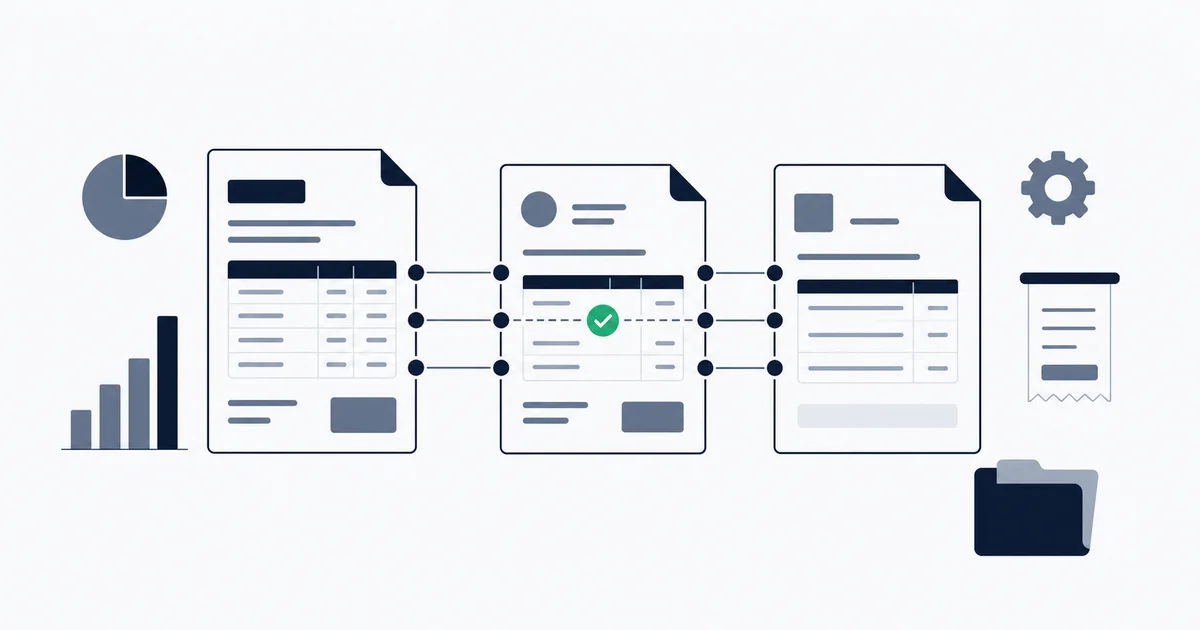
Invoice matching software automates the accounts payable control that verifies an invoice before you pay it. It compares the vendor's invoice against the purchase order it relates to and, in a three-way match, against the goods receipt that confirms delivery, then checks that all of them agree on quantities, prices, and totals within a tolerance you set. Invoices that match cleanly clear automatically. Anything outside tolerance, a short delivery, a price above the PO, an unrecognized vendor, routes to a human as an exception. The point is not to remove people; it is to make sure a person only looks at the invoices that actually need a decision.
What invoice matching is, as a control
Invoice matching sits at the front of the accounts payable process, before any payment is approved. Its job is to answer one question with documents rather than trust: should this invoice be paid, and for exactly this amount? Matching is one stage of the wider invoice management system; our lifecycle guide shows where it fits between capture, approval, payment, and archive.
There are two levels you will encounter in matching software. This section is deliberately brief; the full theory, four matching levels, and worked numeric examples live in our guide on what invoice reconciliation is. Read that for the depth. Here is what you need to understand the matching engine.
Two-way matching: invoice against purchase order
Two-way matching compares the vendor's invoice against the purchase order your company issued. The questions are whether the vendor, line items, quantities, and amounts on the invoice agree with what was ordered, within your tolerance. If they agree, the invoice clears for payment. If they do not, it becomes an exception. Two-way matching is the common default for services, SaaS subscriptions, and professional fees, where there is no physical delivery to verify and therefore no third document to add.
Three-way matching: add the goods receipt
Three-way matching adds the goods receipt or delivery confirmation as a third document. An invoice only clears when it agrees with both the purchase order and proof that what was ordered actually arrived. This is the standard control for businesses that buy physical inventory, materials, or milestone-billed work, because it is the control that stops you paying for goods that were never delivered. The matching engine has to reconcile three documents simultaneously rather than two, which is why three-way auto-match rates tend to run lower than two-way.
The control logic is simple. The mechanics of doing it automatically, across hundreds of invoices, with messy vendor names and timing gaps, are where the software earns its place.
How an automated matching engine works
This is the part the marketing pages skip. An invoice matching engine is not a single comparison. It is a pipeline of decisions, each with a rule you can usually configure, and understanding them is how you tell good software from a checkbox feature.
Tolerance thresholds
Exact equality between an invoice and its purchase order is rare. A vendor calculates tax to a slightly different rounding rule, a currency conversion lands a cent off, a freight line is split differently. If the engine demanded perfect equality, almost nothing would auto-clear.
A tolerance threshold defines how much variance is acceptable before the engine treats two values as a non-match. It is set two ways, usually at the same time:
- Absolute: clear if the difference is under a fixed amount, for example $2.00.
- Percentage: clear if the difference is under a share of the total, for example 1 percent of the invoice value.
Mature engines apply the lower of the two, so a 1 percent tolerance does not quietly allow a $400 variance on a $40,000 invoice. A discrepancy inside the threshold posts to a variance account (FX variance, rounding, freight) and the match clears. A discrepancy outside it becomes an exception. The art is in the setting: too tight and the exception queue fills with one-cent rounding noise that nobody should be reviewing; too loose and a genuine overcharge slides through under the radar. Good software lets you set tolerances per vendor or per account, because a $2 tolerance that is sensible for office supplies is reckless for a five-figure equipment invoice.
Vendor-name normalization
This is the single most underrated part of a matching engine, and the place cheap tools fail quietly. The vendor on a purchase order is rarely spelled the way it appears on the invoice or the bank transaction. The same supplier shows up as AMZN Mktp, Amazon.com Services LLC, AMAZON.COM*2X4Y7, and Amazon Web Services depending on the entity, the channel, and what the payment processor wrote on the line.
A real matching engine does not compare these strings literally. It normalizes them: stripping legal suffixes (LLC, Inc, Ltd), removing payment-processor noise and reference codes, collapsing case and punctuation, and resolving the cleaned forms to a single canonical vendor identity. The better engines also learn from past confirmed matches, so the first time a reviewer confirms that AMZN Mktp is the same supplier as your Amazon.com Services LLC purchase order, that mapping is remembered and applied automatically afterward. Without this step, every vendor naming variation becomes a false exception, and the auto-match rate collapses no matter how good the amount logic is.
Date-window matching
An invoice dated March 30 may be paid March 31, but an ACH transfer does not clear until April 2, and a mailed check can take ten days or more. If the engine insisted that the invoice date and the clearing date fall in the same period, legitimate matches would constantly fail.
Date-window matching allows a configurable float between related dates. A typical window is 3 to 5 business days for electronic payments and 10 to 15 days for checks. The engine treats a match as valid if the dates fall within the window and flags anything outside it for review rather than discarding it. This is also what makes timing-gap exceptions, an invoice in one period that clears in the next, surface as a review item rather than vanish into an unexplained gap.
Confidence scoring
Real engines do not return a binary matched or not-matched. They produce a confidence score by weighing how well each dimension agreed: amount within tolerance, vendor identity resolved, date inside the window, quantities reconciled against the receipt. A clean invoice from a known vendor with an exact PO and amount scores high; an invoice where the amount matches but the vendor name only partially resolved scores lower.
You then set a threshold. Matches above it clear automatically. Matches below it route to a person. This is what lets a finance team tune the balance between automation and control: raise the threshold and more invoices get human eyes (safer, slower); lower it and more clear automatically (faster, with more trust placed in the engine). A tool that only offers match or no-match, with no score and no threshold, gives you no way to make that tradeoff deliberately.
The exception queue
Everything that does not clear lands in the exception queue, and the quality of that queue is what separates software people keep from software people abandon.
A bad exception queue is a flat list of unmatched invoices with no context, leaving the reviewer to open three systems and reconstruct what went wrong. A good one tells the reviewer exactly why the match failed (amount over tolerance by $52, vendor unresolved, quantity short by 13 units), shows the invoice, the PO, and the receipt side by side, and offers the obvious resolutions: accept the variance, request a corrected invoice, split the match, or confirm a new vendor mapping. The whole economic case for matching automation rests here. The engine is not valuable because it clears the clean 85 percent; that work was cheap anyway. It is valuable because it isolates the 15 percent that need a decision and presents each one so the decision takes seconds instead of minutes.
Start for free and extract your first 10 invoices without a credit card.
What distinguishes invoice matching software
Once you understand the engine, evaluating tools gets simpler. You are not comparing feature lists; you are comparing four things. (For a broad side-by-side of seven reconciliation tools across tiers, from BlackLine to QuickBooks, see our invoice reconciliation software guide. This section is about the matching capability specifically, not a tool roundup.)
Match types supported. Does the tool do two-way only, or two- and three-way? Does three-way matching actually reconcile a goods receipt, or is it marketing language over a two-way comparison? If you buy physical goods, a tool that cannot ingest and reconcile a receiving document is not doing the control you need.
Auto-match rate, honestly stated. A vendor quoting a 95 percent auto-match rate is quoting it on clean two-way data. Your rate depends on your inputs. Ask what the rate looks like for three-way matching, and what input quality it assumes. A high exception rate after rollout is almost always a data problem, inconsistent vendor identifiers or missing PO numbers, not a software defect, and no engine fixes upstream chaos by matching harder.
Exception handling quality. This is the one to test in a pilot, not read about. Create a deliberate mismatch, a short delivery, a price over the PO, an unrecognized vendor, and see what the queue gives the reviewer. Context and one-click resolutions, or a bare list and a lookup job?
How it differs from plain bank-feed matching. The reconciliation built into QuickBooks Online and Xero is bank-feed matching: it checks an imported bank transaction against a recorded payment. That is account-level and after the fact, closer to matching your cash balance against the bank statement at period-end than to verifying a single invoice. Invoice matching is document-level and before payment. The distinction matters because a business can have perfectly reconciled bank feeds and still be paying duplicate or overcharged invoices, since the bank feed only ever sees the payment, never the purchase order and receipt that should have justified it. If duplicate payments and vendor overcharges are your problem, bank-feed reconciliation will not catch them; invoice matching is the control that does.
How Inbox Ledger's matching engine works
Inbox Ledger applies the matching engine described above to a specific workflow: matching invoices captured automatically from your email against your bank-statement transactions, with no manual data entry in front of it.
The flow is end to end. Invoices arrive in your inbox and are captured from Gmail, Outlook, IMAP, or a forwarding address, with the vendor, amount, date, and line items extracted automatically. Bank statements are parsed from PDF, CSV, XLSX, OFX, QFX, MT940, and BAI2 formats. The matching engine then runs the same logic any serious engine does: tolerance thresholds, vendor-name normalization across naming variations, date-window matching, and AI-powered confidence scoring with a threshold you configure. High-confidence matches clear on their own. Everything below the threshold lands in an exception queue where you review the invoice and the transaction together. The full feature is described on the reconciliation feature page.
Here is the honest scope, because positioning a matching tool as something it is not is how trust gets lost. Inbox Ledger does invoice-to-bank matching well. It is not a full procure-to-pay platform. There is no purchase-order module, no approval workflow, and no ERP general ledger. If your control requirement is genuine three-way matching against POs and receiving documents inside a procurement system, Inbox Ledger does not cover that, and one of the enterprise platforms in our reconciliation software guide will fit better. If your problem is that invoices live in email, never get into your books cleanly, and reconciling them against the bank is a manual slog every close, that is the exact job this engine is built for. For head-to-head breakdowns against specific tools, see our alternatives comparison hub.
| Manual | Automated with Inbox Ledger |
|---|---|
| Open each invoice and each bank line by hand, eyeball vendor and amount, resolve naming variations from memory, track exceptions in a side spreadsheet, repeat every close cycle. Roughly 8 to 12 hours per month at 200 invoices, with duplicate and overcharge detection depending entirely on the bookkeeper's attention. | Invoices captured from email and bank statements parsed automatically, matched on tolerance, normalized vendor identity, and a date window, with confidence-scored auto-clearing and a context-rich exception queue. Roughly 1 to 3 hours per month on genuine exceptions, with the same rules applied every cycle regardless of fatigue or volume. |
This is the broader picture of where matching fits in the close. For the account-level and balance-sheet side of the workflow, the period-end substantiation that sits above invoice matching, see our guide on account reconciliation software.
Invoice matching software is, at its core, one well-built engine and a queue. The engine compares documents against rules you control and decides what is clean. The queue hands you the rest with enough context to resolve it fast. Tools that get the engine right, real tolerance logic, genuine vendor normalization, sensible date windows, confidence scoring you can tune, save you the mechanical work and put your attention exactly where judgment is actually required. Tools that wrap a literal string comparison in matching language bury you in false exceptions and quietly let the real ones through. Evaluate the engine, test the exception queue with a deliberate mismatch, and pick the one whose definition of a match matches yours.