Invoice Processing Automation
What invoice processing automation actually covers, the six stages it replaces, how to calculate ROI for your team, and what fully autonomous AP looks like in practice.

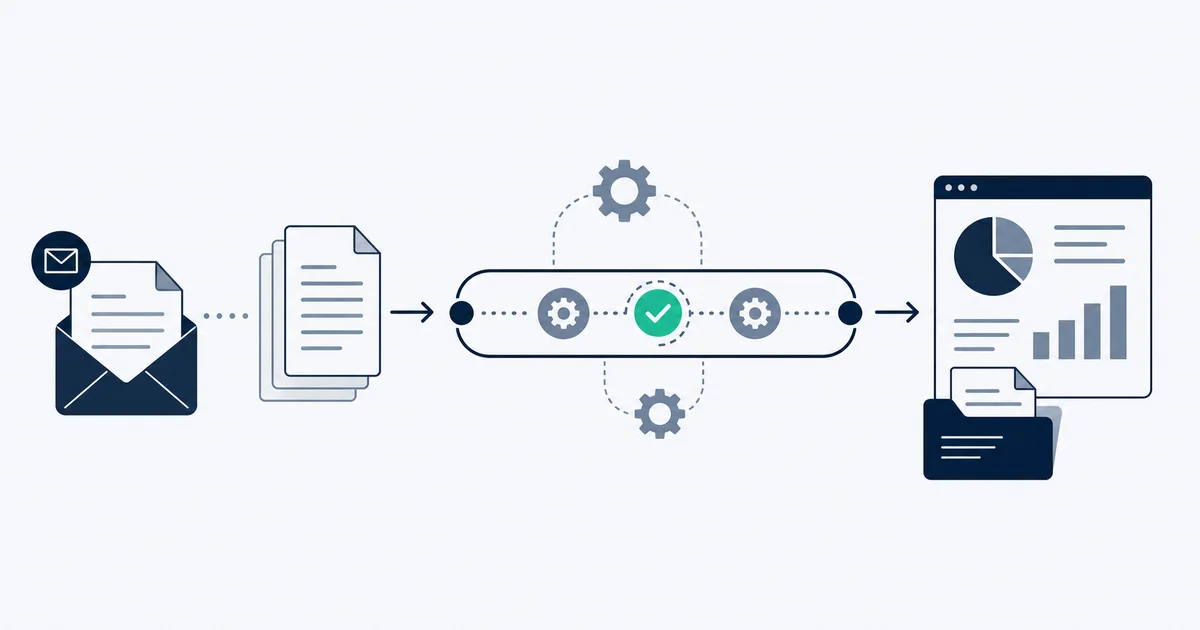
Accounts payable teams have been promised "paperless invoicing" for two decades. What most of them got was the same workflow with PDFs instead of paper. Invoice processing automation, the real kind, replaces the workflow itself, not just the medium.
Invoice processing automation is software that handles every step between receiving a vendor invoice and posting a payment-ready record to your accounting system: ingestion from email and portals, AI field extraction, validation against purchase orders, approval routing, and GL posting. Real automation is measured by straight-through-processing rate, not by scanning PDFs faster.
This piece covers what that actually means: what the full end-to-end pipeline looks like, the six stages automation replaces, how to think about levels of automation, the technology stack underneath it, how vendor-side invoicing differs from buyer-side AP, how to calculate ROI for your specific situation, and where the field is heading. Automation is the engine; if you want the wider picture of how a received invoice moves from inbox to archive as a whole, see our guide to the invoice management system that this pipeline sits inside.
What invoice processing automation actually does
The phrase "invoice processing automation" covers a lot of ground. At minimum it means extracting data from invoice documents without manual keying. At its fullest it means a pipeline that ingests invoices from any source, validates them against purchase orders and receiving records, routes them through approval workflows based on configurable rules, and posts payment-ready records to your accounting system, all without anyone touching the majority of documents.
The boundary condition that separates real automation from "we scan PDFs and re-key them faster" is straight-through processing rate: the share of invoices that complete the full pipeline from receipt to posting without any human intervention. Top automated AP operations commonly report straight-through rates well above half their volume. Average manual AP teams are at zero percent. The gap is what automation is actually about.
That rate is not fixed. It depends on how clean your vendor set is, how consistent their invoice layouts are, how well-configured your validation rules are, and how long the system has had to learn your specific combination of vendors. Most teams see straight-through rates improve significantly over the first 90 days as the system handles more of their vendor set.
The six stages automation replaces
Manual invoice processing has six distinct stages. Automation handles each differently.
Stage 1: Ingestion
Manual: someone checks an inbox, downloads PDFs, saves them to a shared folder, and logs receipt in a spreadsheet. Often this is a daily task that creates a queue.
Automated: the system connects directly to email inboxes (Gmail, Outlook, forwarding addresses), file upload endpoints, vendor portals, and any other source. Invoices are picked up within seconds of arrival. No queue builds. AI processing handles the classification step, filtering out non-invoice documents so only billable records enter the pipeline.
For email-based ingestion specifically, the challenge is that invoices arrive via different patterns: some as PDF attachments, some as HTML receipts with linked PDFs on vendor portals, some as notification-only emails requiring a portal download. Proper ingestion handles all three. Vendors like Stripe send attached PDFs by default, while AWS only emails the PDF once you switch that on in Billing Preferences. Vendors like Amazon Business send HTML receipts with portal links. Portal-only vendors require a separate pull. We coded how 101 vendors actually deliver their invoices in our vendor invoice delivery dataset, and the split is wider than most intake designs assume.
Stage 2: Extraction
Manual: a person opens the PDF, reads the relevant fields, and types them into an accounting system or spreadsheet. At 30 seconds per field across 10 to 15 fields per invoice, a 200-invoice month represents 20 to 30 hours of data entry alone.
Automated: an AI-powered extractor reads the document and outputs structured data. Core fields include vendor name (normalized, so "AMZN" and "Amazon.com Services LLC" both resolve to the same vendor record), invoice number, issue date, due date, subtotal, tax by rate, total, currency, payment terms, and line items. A well-trained extractor on clean machine-generated PDFs reaches 95 to 99 percent field-level accuracy. On scanned documents, accuracy depends on image quality but should still reach 85 to 95 percent with a modern model. This is where OCR invoice processing has moved on: older tools ran raw optical character recognition and handed you a wall of text to clean up, while a modern AI extractor reads the layout and returns labeled fields directly, so the OCR step is just one stage inside a pipeline rather than the whole job.
The critical addition: a confidence score on each field. Fields below the threshold route to a review queue. Fields above the threshold pass automatically. Without confidence scoring, low-quality extractions flow silently into your books and become audit problems later.
Stage 3: Validation
Manual: someone cross-references the invoice against the purchase order and receiving record, checks the math, and verifies the vendor is on the approved vendor list. This step is often skipped under volume pressure, which is how duplicate payments and overbillings accumulate.
Automated: validation runs rules against every invoice. Three-way matching compares invoice amount and quantity against the PO and goods receipt. Two-way matching covers service invoices without a receiving record. Business rules check: Is this vendor in the approved vendor master? Is the amount within the PO tolerance? Does this look like a duplicate (same vendor, same amount, within 30 days)? Anything that fails routes to an exception queue with the reason flagged.
Organizations with automated three-way matching materially increase how many duplicate invoices they catch relative to manual operations, which lowers the share of duplicate payments that slip through to settlement. At scale, that alone justifies the automation investment.
Stage 4: Routing and approval
Manual: someone emails the invoice to the appropriate approver, waits, follows up, re-sends when it gets buried, and manually tracks the approval chain in a spreadsheet or shared inbox. Cycle time from invoice receipt to approval for manual teams commonly runs well over a week, and slower operations stretch to several weeks; APQC publishes a standard cycle-time measure for tracking this from receipt to payment.
Automated: approval rules define who needs to approve based on amount, vendor category, cost center, or any combination. Invoices route instantly. Approvers get a notification with the invoice preview and one-click approve or reject. Escalation rules fire automatically if an invoice sits unanswered past a threshold. The system holds a complete audit trail: who approved, when, from what device.
Stage 5: Posting
Manual: after approval, someone re-enters the approved invoice into the accounting system, assigns it to the correct GL account, cost center, and project code, and schedules payment.
Automated: posting writes directly to the accounting system via API. GL account assignment uses coding rules built during setup: invoices from category X go to account code Y. For recurring vendors with consistent coding, this step is fully automatic. For new vendors or ambiguous categories, the system surfaces a suggested code with an override option.
Stage 6: Archiving
Manual: the physical or digital invoice is filed somewhere, often inconsistently. Finding a two-year-old invoice during an audit means searching multiple systems.
Automated: every invoice is stored with its extracted data, full metadata, and an immutable hash. Retrieval by any field (vendor, date, amount, invoice number) returns the document in seconds. Retention policies can be configured to match your jurisdiction's requirements. The IRS requires businesses to keep records supporting deductions for three years from the filing date, or six years if income is understated by more than 25 percent (IRS Publication 583). An automated archive enforces that retention without anyone tracking it manually.
Levels of automation
Not all automation is the same. There are three practical levels, and matching the right level to your situation matters more than chasing the highest one.
Assisted automation handles extraction and presents a pre-filled form to a human reviewer, who confirms and posts. Every invoice gets a human touch before it enters the books. Best for: organizations new to automation, high-risk vendor categories, or any situation where the cost of a wrong posting outweighs the cost of a review step. Cycle time improvement is modest, but accuracy improvement over pure manual is significant.
Semi-automated processing routes invoices into one of two tracks: auto-approve for invoices that clear all rules above a configured confidence threshold, and human review for everything else. Straight-through rate is typically 40 to 60 percent in the first months, rising as the system learns your vendor set. Best for: most mid-market AP teams as a starting point. You get meaningful time savings immediately while retaining oversight on the invoices that actually need it.
Fully automated processing posts invoices without human review for all documents that clear all rules. Human attention is reserved for the exception queue only. Straight-through rates at top-quartile operations commonly run well above half their invoice volume. Best for: mature automation deployments with a well-known vendor set, consistent invoice formats, and established approval policies. Getting to this level requires a few months of semi-automated operation to validate accuracy and tune rules.
The practical recommendation for most teams: start semi-automated, track your exception rate by vendor type, and move vendor categories to fully automated as exception rates fall below your threshold. Most teams find that 60 to 70 percent of their invoice volume (recurring SaaS subscriptions, utilities, established service vendors) reaches full automation within 60 to 90 days. The remaining volume typically stays semi-automated because it has genuine complexity: variable line items, partial receipts, project coding decisions that require human judgment.
The technology stack
Invoice processing automation sits on four layers of technology. Understanding what each layer does helps you evaluate tools and spot gaps.
Extraction layer: AI-powered document extraction
This is where documents become structured data. Modern extractors use AI models trained on large corpora of invoice documents across layouts, languages, vendors, and formats. They handle machine-generated PDFs, scanned paper invoices, multi-page documents, credit notes, and proforma invoices. Output quality depends on training data breadth, model architecture, and how well the extractor handles your specific vendor set.
What to look for: field-level confidence scores, explicit exception routing, multi-currency support, VAT and tax decomposition, and multi-language capability if your vendor set spans languages. A tool that extracts total amount but cannot decompose tax by rate is not sufficient for VAT reclaim in the EU or GST claims in Australia.
Workflow engine
This is the rules layer: approval thresholds, routing conditions, escalation timers, exception categories, and posting rules. A good workflow engine is configurable without code. You define rules in plain language (invoices above $5,000 require CFO approval; invoices from these three vendors need a second approver) and the engine enforces them.
ERP and accounting connectors
The workflow is only as useful as the integration with your accounting system. Major platforms (QuickBooks, Xero, Sage, NetSuite, Microsoft Dynamics) have published APIs. The connector handles authentication, field mapping from extracted invoice data to your chart of accounts, and error handling when the integration rejects a record (duplicate key, unknown vendor, invalid GL code).
Native integrations from the automation vendor are more reliable than generic import formats. A vendor that supports your accounting system via API sync, not just CSV export, will save significant time on exception handling.
Analytics layer
AP automation generates data that manual operations never had: per-invoice cycle time, approval wait time by approver, exception rates by vendor, duplicate detection rates, early-payment discount capture percentage. This layer makes the data queryable. Teams that track AP analytics tend to identify and fix specific bottlenecks faster than those operating without that visibility, because they can pinpoint where time is lost rather than guessing.
Start for free and extract your first 10 invoices without a credit card.
Vendor-side invoicing vs. buyer-side AP
This distinction trips up a lot of teams evaluating automation tools, because vendors sell both but they do very different things.
Vendor-side (AR) automation is about how your business sends invoices to its customers. It handles generating invoices from your billing system, delivering them via email or e-invoicing networks, tracking whether they were opened and paid, sending payment reminders, and reconciling payments received against open invoices. If your problem is "we issue invoices and struggle to get paid on time," this is the category you want.
Buyer-side (AP) automation is about how your business receives and processes invoices from your vendors. It handles ingestion, extraction, validation, approval, posting, and archiving. If your problem is "we receive invoices from vendors and it takes too long and costs too much to process them," this is the category you want.
The tools overlap in one area: e-invoicing networks. A true e-invoice (PEPPOL in Europe, ZUGFeRD in Germany, NF-e in Brazil) carries structured data in a machine-readable format alongside or instead of the PDF. When both sides participate in the same network, the buyer-side extraction step becomes largely redundant because the invoice arrives pre-structured. Adoption varies significantly by country. In Scandinavia and parts of continental Europe, e-invoicing mandates mean the majority of B2B invoices arrive structured. In the US and UK, adoption remains lower, and most invoices still arrive as PDFs requiring extraction.
For US and UK teams, buyer-side AP automation via PDF extraction is the practical near-term answer, regardless of how e-invoicing mandates evolve. For EU teams in markets with high e-invoice adoption, look for a tool that handles both structured e-invoices natively and falls back to extraction for vendors not yet on the network.
ROI: how to think about it for your team
ROI calculations for AP automation are usually presented by vendors using optimistic numbers. The honest version is a simple delta: take your current fully loaded cost per invoice (total AP labor plus error-related costs, divided by annual invoice volume; industry benchmarks roughly put average operations at $10 to $15) and subtract the automated cost per invoice (the tool's price plus residual exception-handling labor, since a reviewer only checks the flagged exception rather than re-keying everything). Multiply that difference by annual invoice volume to get direct savings, then add the value of late-payment fees avoided and early-payment discounts captured. Payback periods under 12 months are common at volumes above 100 invoices per month.
For the full step-by-step ROI model, including how to estimate post-automation cost and build the calculation against your own numbers, see the how-to guide to automating invoice processing, which covers the hands-on rollout this calculation justifies.
Implementation considerations
The technology is generally the easier part. What determines whether an implementation sticks is non-technical: change management (the AP job shifts from data entry to exception review and analytics, so frame automation as freeing the team for judgment work rather than diminishing it), vendor communication (you have to actively ask vendors for clean, PO-referenced invoices, using payment as the lever), and short, just-in-time training for approvers on the new approval and exception interfaces. The how-to guide to automating invoice processing walks through the rollout phases, pilot setup, and change-management sequence in detail.
What is on the horizon
Two developments are moving from pilot-stage to production-ready for most mid-market teams.
Generative AI for exceptions
The current exception queue puts a human in front of a flagged invoice with a reason code. Generative AI moves this toward: here is the invoice, here is why it failed, here is the most likely resolution, and here are the three options with one pre-filled based on how similar exceptions were resolved before. The human still decides, but with a suggested resolution rather than a blank screen. This compresses exception handling time from 5 to 10 minutes per invoice to under 2 minutes for most common exception types.
Agent-based workflows
The further step: AI agents that handle multi-step resolution without waiting for human input on routine decisions. An agent noticing a vendor invoice with a PO number that does not match any open PO can check the vendor portal for an updated PO, compare against contract terms, and either resolve the mismatch automatically or escalate with a full summary of what it found. This is not hypothetical; early deployments exist in enterprise environments. The direction is toward AP teams managing agents that handle exceptions, rather than AP teams handling exceptions directly.
The more immediate practical point: tools you evaluate today should have a roadmap that points toward this direction. A tool that treats extraction and approval routing as its ceiling is investing in the layer that will matter least in three to five years. Tools that treat extraction as infrastructure and are building on top of it toward autonomous exception resolution are betting on the layer that will matter most.
For a detailed comparison of tools currently in the market, see our guide to automated invoice capture software. For hands-on implementation guidance, the how-to guide to automating invoice processing covers rollout steps, pilot setup, and accounting system integration in detail. For teams evaluating how other products in the space approach this problem, our AP automation software comparison covers the main alternatives.
The six stages described here, ingestion through archiving, represent decades of accumulated manual work in AP departments. Automation does not compress that work slightly. It eliminates most of it for most invoice types, and concentrates human attention on the decisions that actually require it.